ソフト設計
それでは、具体的なソフト設計に行きます。
今回は ESP32 を使って、PCM1808 で取り込んだ音声をリアルタイムで加工し、PCM5102 に出力する構成にしています。とりあえず音が出るところまで動作したので、コードをブロックごとに整理しながら解説していきます。
I2S の基本設定について
まずは I2S の基本設定です。サンプルレートは22.05kHzにしてみました。CDの半分です。(44.1kHz × 1/2 )
// --- I2S の基本設定 ---
#define I2S_NUM         I2S_NUM_0
#define I2S_SAMPLE_RATE 22050                 // サンプルレート(22.05kHz)
#define I2S_BITS_PER_SAMPLE I2S_BITS_PER_SAMPLE_32BIT
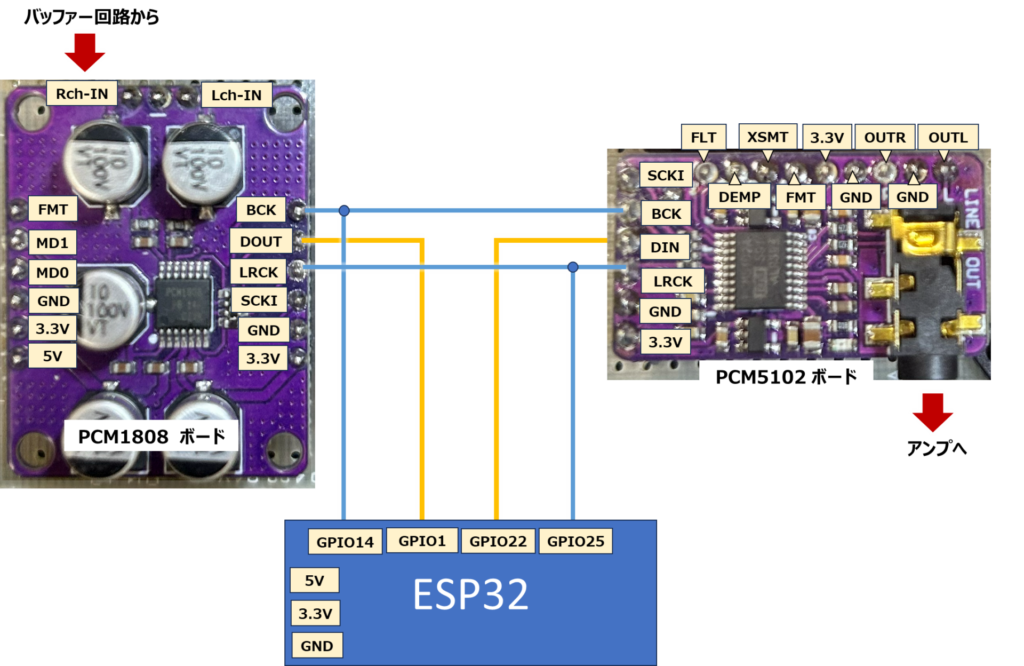
ピン設定(PCM1808 / PCM5102)
ADC と DAC のピン設定は以下の通りです。
// --- ピン設定(PCM1808 / PCM5102 用)---
#define I2S_PIN_BCK     14  // BCK(ビットクロック)
#define I2S_PIN_WS      25  // LRCK(ワードセレクト)
#define I2S_PIN_DATA_IN 15  // PCM1808 → ESP32(ADC)
#define I2S_PIN_DATA_OUT 22 // ESP32 → PCM5102(DAC)
最初はここを間違えていて音が出ず、しばらく悩みました。ハードとソフトの境界は、こうした小さなミスが起きやすいです。
ディストーション処理(クリッピング)
歪み処理は、単純なクリッピング方式を採用しています。サンプルを増幅し、閾値を超えた部分を切り落とすだけのシンプルなものです。
// ------------------------------------------------------------
// ディストーション処理:単純なクリッピング
// ------------------------------------------------------------
int32_t applyDistortion(int32_t sample, int32_t threshold) {
    if (sample > threshold) {
        return threshold;          // 上側クリップ
    } else if (sample < -threshold) {
        return -threshold;         // 下側クリップ
    } else {
        return sample;             // 範囲内ならそのまま
    }
}
増幅率(gain)は 20 倍(後ほどのコード内で設定)にしています。クリッピングの仕方などは、今後調整したい部分です。
リバーブ処理(短い遅延)
リバーブは、短い遅延バッファを混ぜるだけの簡易的なものです。
// ------------------------------------------------------------
// リバーブ処理:短い遅延バッファを足すだけの簡易版
// ------------------------------------------------------------
void applyReverb(int32_t* data, size_t length, int32_t* reverb_buffer) {
    for (size_t i = 0; i < length; i++) {
        int32_t reverb_sample = reverb_buffer[i % REVERB_DELAY]; // 過去のサンプル
        reverb_buffer[i % REVERB_DELAY] = data[i];               // 現在のサンプルを保存
        data[i] = data[i] + reverb_sample / 2;                   // 混ぜる(簡易リバーブ)
    }
}
setup():I2S の初期化
I2S の初期化部分です。
void setup() {

    // --- I2S の動作設定 ---
    i2s_config_t i2s_config = {
        .mode = (i2s_mode_t)(I2S_MODE_MASTER | I2S_MODE_RX | I2S_MODE_TX), // 送受信両方
        .sample_rate = I2S_SAMPLE_RATE,
        .bits_per_sample = I2S_BITS_PER_SAMPLE_32BIT,
        .channel_format = I2S_CHANNEL_FMT_ONLY_RIGHT, // モノラル(右チャンネル)
        .communication_format = I2S_COMM_FORMAT_I2S,
        .intr_alloc_flags = ESP_INTR_FLAG_LEVEL1,
        .dma_buf_count = 8,   // DMA バッファ数
        .dma_buf_len = 64,    // DMA バッファ長
        .use_apll = true,     // APLL 使用(クロック安定)
        .tx_desc_auto_clear = true,
        .fixed_mclk = 0
    };

    // --- ピン設定 ---
    i2s_pin_config_t pin_config = {
        .bck_io_num = I2S_PIN_BCK,
        .ws_io_num = I2S_PIN_WS,
        .data_out_num = I2S_PIN_DATA_OUT,
        .data_in_num = I2S_PIN_DATA_IN
    };

    // --- I2S ドライバ初期化 ---
    i2s_driver_install(I2S_NUM, &i2s_config, 0, NULL);
    i2s_set_pin(I2S_NUM, &pin_config);
    i2s_zero_dma_buffer(I2S_NUM);

    // --- クロック設定(モノラル) ---
    i2s_set_clk(I2S_NUM, I2S_SAMPLE_RATE, I2S_BITS_PER_SAMPLE_32BIT, I2S_CHANNEL_MONO);
}
APLL を有効にするとクロックが安定するようなので、true にしています。
loop():リアルタイム処理
ここで実際の音声処理が行われます。
void loop() {
    size_t bytes_read, bytes_written;
    int32_t i2s_data[64];                         // I2S 受信バッファ
    static int32_t reverb_buffer[REVERB_DELAY] = {0}; // リバーブ用リングバッファ

    int32_t threshold = 0x0FFFFFFF; // クリッピング閾値(仮)
    float gain = 20.0;              // 増幅率(強め)

    // --- PCM1808 から音声データを読み込み ---
    i2s_read(I2S_NUM, (char*)i2s_data, sizeof(i2s_data), &bytes_read, portMAX_DELAY);

    // --- ディストーション処理 ---
    for (int i = 0; i < bytes_read / sizeof(int32_t); i++) {
        i2s_data[i] = (int32_t)(i2s_data[i] * gain);          // 増幅
        i2s_data[i] = applyDistortion(i2s_data[i], threshold); // クリッピング
    }

    // --- リバーブ処理 ---
    applyReverb(i2s_data, bytes_read / sizeof(int32_t), reverb_buffer);

    // --- PCM5102 へ出力 ---
    i2s_write(I2S_NUM, (const char*)i2s_data, bytes_read, &bytes_written, portMAX_DELAY);
}
とりあえず音は出ています。歪みもリバーブも、それっぽい音にはなっていますが、まだ「エフェクター」というより「実験用の音」という印象です。
全コードまとめ
#include <Arduino.h>
#include <driver/i2s.h>

// --- I2S の基本設定 ---
#define I2S_NUM         I2S_NUM_0
#define I2S_SAMPLE_RATE 22050                 // サンプルレート(軽め)
#define I2S_BITS_PER_SAMPLE I2S_BITS_PER_SAMPLE_32BIT

// --- ピン設定(PCM1808 / PCM5102 用) ---
#define I2S_PIN_BCK     14  // BCK(ビットクロック)
#define I2S_PIN_WS      25  // LRCK(ワードセレクト)
#define I2S_PIN_DATA_IN 15  // PCM1808 → ESP32(ADC)
#define I2S_PIN_DATA_OUT 22 // ESP32 → PCM5102(DAC)

// --- エフェクト用 ---
#define REVERB_DELAY    100 // リバーブ遅延(サンプル数)

// ------------------------------------------------------------
// ディストーション処理:単純なクリッピング
// ------------------------------------------------------------
int32_t applyDistortion(int32_t sample, int32_t threshold) {
    if (sample > threshold) {
        return threshold;          // 上側クリップ
    } else if (sample < -threshold) {
        return -threshold;         // 下側クリップ
    } else {
        return sample;             // 範囲内ならそのまま
    }
}

// ------------------------------------------------------------
// リバーブ処理:短い遅延バッファを足すだけの簡易版
// ------------------------------------------------------------
void applyReverb(int32_t* data, size_t length, int32_t* reverb_buffer) {
    for (size_t i = 0; i < length; i++) {
        int32_t reverb_sample = reverb_buffer[i % REVERB_DELAY]; // 過去のサンプル
        reverb_buffer[i % REVERB_DELAY] = data[i];               // 現在のサンプルを保存
        data[i] = data[i] + reverb_sample / 2;                   // 混ぜる(簡易リバーブ)
    }
}

void setup() {

    // --- I2S の動作設定 ---
    i2s_config_t i2s_config = {
        .mode = (i2s_mode_t)(I2S_MODE_MASTER | I2S_MODE_RX | I2S_MODE_TX), // 送受信両方
        .sample_rate = I2S_SAMPLE_RATE,
        .bits_per_sample = I2S_BITS_PER_SAMPLE_32BIT,
        .channel_format = I2S_CHANNEL_FMT_ONLY_RIGHT, // モノラル(右チャンネル)
        .communication_format = I2S_COMM_FORMAT_I2S,
        .intr_alloc_flags = ESP_INTR_FLAG_LEVEL1,
        .dma_buf_count = 8,   // DMA バッファ数
        .dma_buf_len = 64,    // DMA バッファ長
        .use_apll = true,     // APLL 使用(クロック安定)
        .tx_desc_auto_clear = true,
        .fixed_mclk = 0
    };

    // --- ピン設定 ---
    i2s_pin_config_t pin_config = {
        .bck_io_num = I2S_PIN_BCK,
        .ws_io_num = I2S_PIN_WS,
        .data_out_num = I2S_PIN_DATA_OUT,
        .data_in_num = I2S_PIN_DATA_IN
    };

    // --- I2S ドライバ初期化 ---
    i2s_driver_install(I2S_NUM, &i2s_config, 0, NULL);
    i2s_set_pin(I2S_NUM, &pin_config);
    i2s_zero_dma_buffer(I2S_NUM);

    // --- クロック設定(モノラル) ---
    i2s_set_clk(I2S_NUM, I2S_SAMPLE_RATE, I2S_BITS_PER_SAMPLE_32BIT, I2S_CHANNEL_MONO);
}

void loop() {
    size_t bytes_read, bytes_written;
    int32_t i2s_data[64];                         // I2S 受信バッファ
    static int32_t reverb_buffer[REVERB_DELAY] = {0}; // リバーブ用リングバッファ

    int32_t threshold = 0x0FFFFFFF; // クリッピング閾値(仮)
    float gain = 20.0;              // 増幅率(強め)

    // --- PCM1808 から音声データを読み込み ---
    i2s_read(I2S_NUM, (char*)i2s_data, sizeof(i2s_data), &bytes_read, portMAX_DELAY);

    // --- ディストーション処理 ---
    for (int i = 0; i < (int)(bytes_read / sizeof(int32_t)); i++) {
        i2s_data[i] = (int32_t)(i2s_data[i] * gain);           // 増幅
        i2s_data[i] = applyDistortion(i2s_data[i], threshold); // クリッピング
    }

    // --- リバーブ処理 ---
    applyReverb(i2s_data, bytes_read / sizeof(int32_t), reverb_buffer);

    // --- PCM5102 へ出力 ---
    i2s_write(I2S_NUM, (const char*)i2s_data, bytes_read, &bytes_written, portMAX_DELAY);
}
今回はここまで。続く。
リンク
リンク
リンク
リンク
コメント